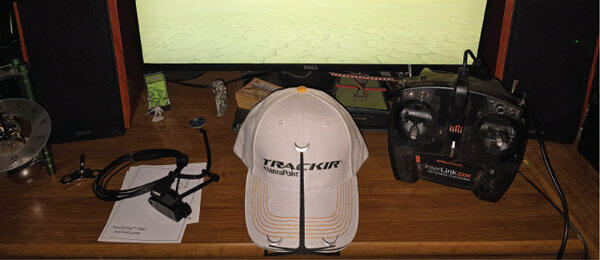
TRACKIR 5 IS A head-tracking input device for use with games and simulators on a PC, including RealFlight. More than 100 games and simulators are currently supported, and the list can be found on the company’s website.
You have two options when it comes to using TrackIR, the TrackClip, and the TrackClip Pro. The TrackClip attaches to the brim of a ball cap to track your head movements, while the TrackClip Pro attaches to a headset. The TrackClip is completely wireless, and the Pro has a USB cable.
TrackIR includes the camera, quick start guide, TrackClip or TrackClip Pro, or both, depending on the configuration, and the camera mount that attaches to the top of your monitor. Software is not included, but it can be downloaded from the company’s website.
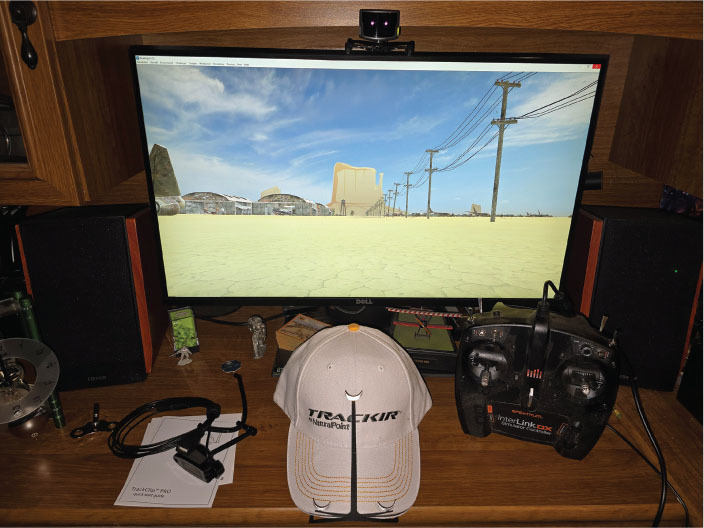
To set it up, download and install the software, plug in the camera to an open USB port on your computer, and attach the camera to the monitor. Attach the TrackClip to a hat or the TrackClip Pro to a headset and launch the software.
The software provides a grid on your monitor so that you can align the positioning of your tracking device to be in the center of the screen.
The method for activating TrackIR in games can vary. It is necessary to have the TrackIR software running first, and then launch the game. In RealFlight, if the program recognizes TrackIR, you simply click on View at the top of the RealFlight screen and go to Head Tracking at the bottom. This will allow you to enable or disable TrackIR in RealFlight.
If TrackIR is not recognized in RealFlight, you can press the tilde (∼) key on your keyboard and type in TrackIR and hit enter. That should enable it in the program.
What is it like flying with it? It is fun to use, and it works in different camera angles. In the fixed-position view, how do you normally see the aircraft when you are flying? You can look left, right, up, and down. RealFlight automatically tracks the airplane to a degree, but TrackIR lets you look farther than normal in the fixed-position mode, such as looking farther ahead of the aircraft.
If you switch to other views, such as the nose or chase view, it is even more enjoyable to be able to look around, up, down, left, and right from the perspective of the aircraft. Keep in mind that additional camera angles are not available if you are flying from a Photofield airport. In the photo, flying was done at the "Boneyard."
TrackIR can be used with other simulators, such as Microsoft Flight Simulator, and in 100 other games. It has proven to be an enjoyable addition to the simulator experience. Pricing varies, depending on the options, but expect to pay approximately $150 to $175.
SOURCES:
TrackIR


Comments
Add new comment